Designing the AI trading workflow for quant engineers and tradersDesigning the AI trading workflow
for quant engineers and traders
Feb - Apr 2026
TLDR
Overview
A 0-to-1 AI-native product, designed from the ground up for how quant engineers and traders research, build, and deploy trading strategies.
My role
- Owned all UX/UI design from zero to launch, shaping the product's visual and interaction language.
- Worked closely with AI engineers and internal quant engineers throughout the entire design process.
- Defined the core user experience by designing conversational workflows that enable real collaboration between the AI and the user.
Solutions
See more detailsProduct Info
ClyptAI is an AI-powered workspace where quant engineers and traders can build, backtest, and deploy automated trading strategies through conversation. By simply describing an investment idea, users can instantly turn concepts into actionable, market-ready strategies.
Problems
User Problems
Quant engineers struggle with a fragmented workflow, losing critical context as they switch between disconnected tools for research, backtesting, and deployment. They typically use 4-6 tools in a single working session.
Users naturally second-guess AI-generated outputs. When real money is on the line, this lack of trust becomes a critical blocker.
Business Problems
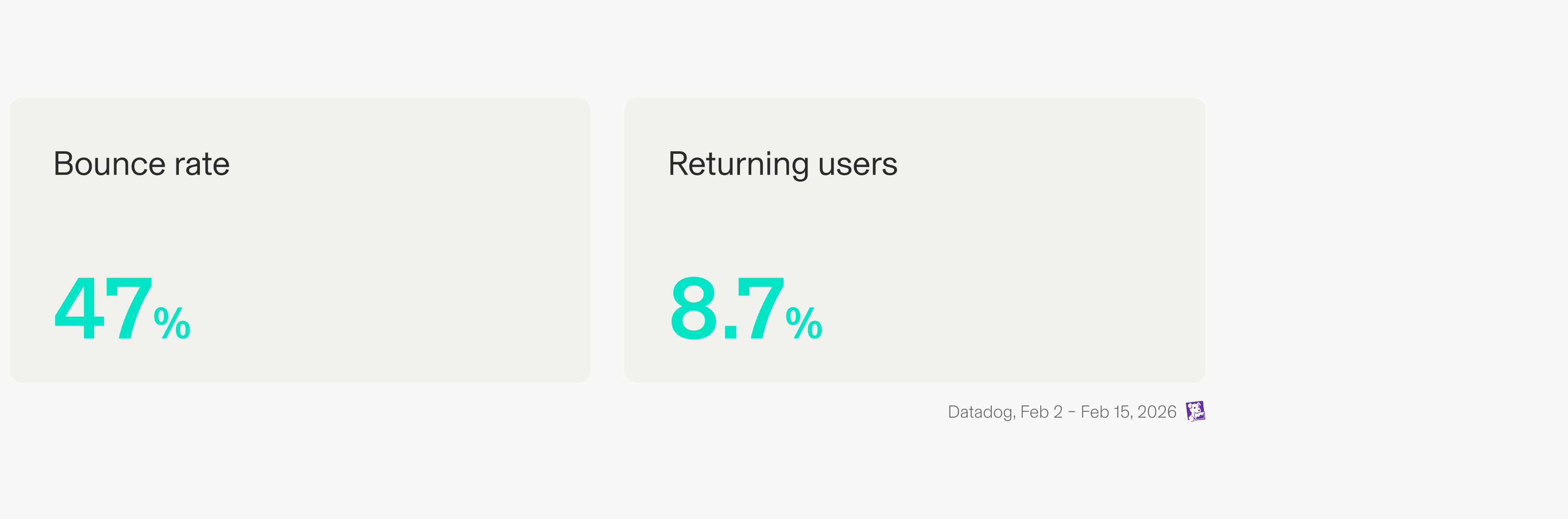
As a newly launched product, driving early user adoption is critical. But building strategies with AI is an unfamiliar concept, and that creates a cold start problem that risks losing users before they see the value. Data shows only 8.7% of users returned after their first visit, with nearly half bouncing before seeing the product's core value.

How might we build an AI workspace that earns users' trust from the first interaction, and guides them seamlessly from idea to deployment, all in one place?
UX Strategy
One Workspace, Full Journey
Design one uninterrupted flow inside a single workspace, from ideation to validation to live deployment, so users can complete the full journey without losing context as they jump between tools.
Earn Trust at Every Step
Built every AI interaction around clarity and reasoning, so users know exactly why a result was generated and feel ready to act on it, from their very first session.
Solutions
Three Panels, One Complete Journey
Divided into three connected panels, chat to ideate with AI, code to build and test, and deploy to validate and go live, all without switching to different tools.
The Right Starting Point for Every User
Developed three distinct onboarding flows based on user proficiency, whether you're a seasoned quant or exploring for the first time.
Every Run, Fully Tracked
Designed a version history that logs every backtest run, so engineers can track what changed, compare results, and iterate with confidence.
Validate Before You Commit
Designed a confirmation stage where the platform surfaces potential risks internally, giving users the confidence to trust what they're about to execute.
Takeaway
Finding UX wins within technical limits
Worked closely with the CTO and engineers to navigate technical constraints, constantly finding the balance between the ideal user experience and what was feasible to build. For example, deploying a live strategy required validation first, due to safety and technical constraints. I designed a way to guide users through that step naturally, without making it feel like friction. I also kept a list of ideas that weren't feasible yet but could be revisited once the technical constraints changed. Thinking this way pushed me to grow as a designer, beyond just what was buildable today.
Prompts designed for every type of user
The biggest takeaway for me was realizing that prompts and conversations are UX. Wording a system prompt with AI engineers carried the same weight as designing a screen. This experience pushed me to think more broadly as a designer, especially when making sure a first-time user’s experience didn’t feel intimidating or off-putting. Mapping out different scenarios based on the user's initial prompt forced me to consider far more entry points than a typical screen-based flow would.